
Tinkerers - CSSE Functions JS Lesson
Categories: JavaScriptThis lesson explains JavaScript functions.
- Instructors:</h3>
Role Name 📋 Scrum Master Anish Gupta 💻 Scrummer James Blazek 💻 Scummer Vihaan Budhraja
- Setup
- What are functions?
- Program Output
- Program Output
- Program Output
- Program Output
- Try it out for yourself!
- Program Output
- Program Output
- Defining Functions & Function Syntax
- Example of Returning in Word Game
- 🍿 POPCORN HACK NO. 1 🍿
- More Function Use Cases
- Functions for Abstraction
- Scope
- This is because of SCOPE!
- 🍿 POPCORN HACK NO. 2 🍿
- Recursion
- Arrow Functions (if time)
- Result
- Result
- HOMEWORK 😈
Instructors:</h3>
| Role | Name |
|---|---|
| 📋 Scrum Master | Anish Gupta |
| 💻 Scrummer | James Blazek |
| 💻 Scummer | Vihaan Budhraja |
Setup
Copy the homework file into your personal repository by doing this: 1. Open the `Open-Coding-Society/pages` repo in one VSCode window and your own `portfolio` repo in the other 2. Drag and drop `2025-09-29-functions_tinkerers_js_hw.ipynb` from pages to your own repo. It is in `_notebooks/CSSE/JavaScriptLessons/Functions`. Alternatively, you can use wget: ```bash # First cd to the base of your repo mkdir -p _notebooks/CSSE/JavascriptLessons/Functions wget -O _notebooks/CSSE/JavascriptLessons/Functions/2025-09-29-functions_js_tinkerers_hw "https://raw.githubusercontent.com/Open-Coding-Society/pages/main/_notebooks/CSSE/JavaScriptLessons/Functions/2025-09-29-functions_js_tinkerers_hw.ipynb" ``` Your homework is now copied into your personal repo! This notebook also contains popcorn hacks #1 and #2.What are functions?
> Functions in programming are modular units of code designed to perform specific tasks. They encapsulate a set of instructions, allowing for code reuse and organization. - GeeksForGeeks Functions allow you to take a piece of code, and almost put it into a box so you can reuse it a lot of times. It also let you modularize code. For example, let's look at the code below. ```python %%htmlProgram Output
Program Output
Program Output
Program Output
Try it out for yourself!
```python %%html
Program Output
Program Output
flowchart LR
A["Inputs: Alice, 16"] --> B["greet() function"]
B --> C["Output: Hello, Alice (16)!"]
A2[Inputs: Bob, 999999999] --> B
B --> C2["Output: Hello, Bob (999999999)!"]
A3[Inputs: Charlie, 1] --> B
B --> C3["Output: Hello, Charlie (1)!"]
A4[Inputs: myname, myage] --> B
B --> C4["Output: Hello, [myname] ([myage])!"]
classDef func fill:#4169e1,stroke:#333,stroke-width:2px,color:#ffffff;
class B func;
Defining Functions & Function Syntax
The code to create a function is as follows:  Let's look at the below code. ``` function add(a, b) { return a + b; } ``` `add` is the name of the function. A common JavaScript convention is to use camelCase. Function names are usually verbs- like calculateSum(), drawText(), startGame(), etc. because they do something. `a` and `b` are parameters. You aren't fixed to 2 parameters: you can have one, three, zero, or five hundred (if you want to for some reason). Parameters are like the input to a function: information that the function takes in to be proccessed. (Side note: Parameters are the variables listed in the function definition. Arguments are the actual values you pass when calling the function.) Next, we use curly braces { } to represent that "hey, the code for **this function specifically** starts/ends here!" The `return` keyword is the output of a function: Mozilla says that > The return statement ends function execution and specifies a value to be returned to the function caller. Here's an example: ```js function add(a, b) { return a + b; } let result = add(5, 6); console.log(result); // Logs 11 ``` Let's do a practice: what will the below function output and why? ```js function add(a, b){ console.log(a+b); } let result = add(5, 6); console.log(result); ```View solution
The first log to the console will display 11. The second log will say undefined. This is because the function is not returning anything, and result is being set to a value that does not exist.Example of Returning in Word Game
``` function wrapText(text, maxWidth) { const words = text.split(' '); const lines = []; let currentLine = words[0]; for (let i = 1; i < words.length; i++) { const word = words[i]; const width = wordCtx.measureText(currentLine + ' ' + word).width; if (width < maxWidth) { currentLine += ' ' + word; } else { lines.push(currentLine); currentLine = word; } } lines.push(currentLine); // Add the last line return lines; } ```🍿 POPCORN HACK NO. 1 🍿
Let's start making our own functions :) Head over to `2025-09-29-functions_tinkerers_js_hw.ipynb` to do the popcorn hack. Didn't download it yet? Check the **setup section** at the top of this lesson.More Function Use Cases
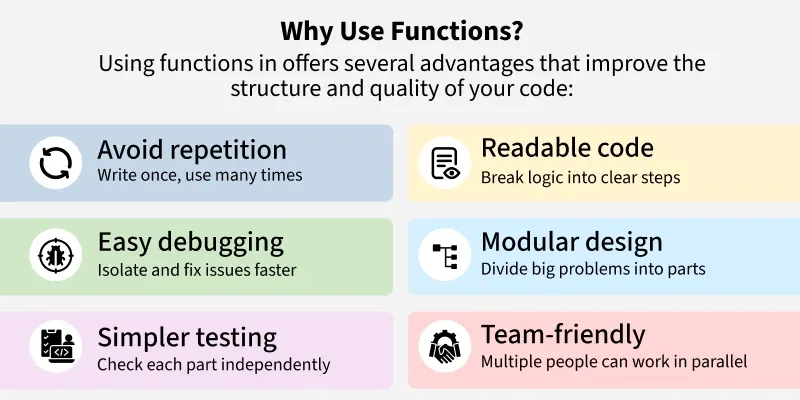 > Functions can be used to reuse code. Let's say I have a function that I need to call multiple times. For example, in Word Game, there is a function called drawText() with this code: ```js function drawText(text) { wordCtx.clearRect(0, 0, wordCanvas.width, wordCanvas.height); wordCtx.font = '24px "Times New Roman", Times, serif'; wordCtx.fillStyle = '#dededeff'; wordCtx.textAlign = 'center'; const maxWidth = wordCanvas.width - 20; // Leave some padding const lineHeight = 30; // Line height for wrapped text const lines = wrapText(text, maxWidth); const startY = (wordCanvas.height - lines.length * lineHeight) / 2; // Center vertically lines.forEach((line, index) => { wordCtx.fillText(line, wordCanvas.width / 2, startY + index * lineHeight); }); } ``` This function is called *twice* in wordgame.md: once when the game starts and once to clear the canvas after done typing. This keeps us from having to write this code twice. Instead, we can define it ONCE and call it whenever we want: if we wanted to call it 67 times for some reason, instead of copy pasting the code 67 times, we can just call drawText() whenever needed.Functions for Abstraction
> Functions in Programming allow programmers to abstract the details of a particular operation. Instead of dealing with the entire implementation, a programmer can use a function with a clear interface, relying on its functionality without needing to understand the internal complexities. Functions hide the details of their operation, allowing the programmer to think at a higher level. - GeeksForGeeks In word game, instead of implementing the whole program, we can tackle the steps one by one. These functions are: - `drawText(text)` – Draws the prompt text centered on the canvas - `wrapText(text, maxWidth)` – Splits text into lines that fit within `maxWidth` - `drawUserText(prompt, input)` – Draws the prompt and user input, highlighting correct/incorrect chars and showing the caret - `updateStats(prompt, input, startTime)` – Updates WPM and accuracy stats - `finishGame(prompt, input, startTime)` – Handles game end, calculates mistakes, and shows finish overlay - `startGame()` – Starts a new game, picks a prompt, and sets up key input handling - `setProgress(percent)` – Updates the progress bar width and text - `updateProgress(prompt, input)` – Computes progress from input length and updates the bar - `createOptionButton(text, val)` – Creates a modal button to select string length - `escHandler(ev)` – Handles Escape key to close the options menuScope
Scope is a common pitfall for those learning functions. Press the button below to run the following code snippet. ```python %%html ```This is because of SCOPE!
Essentially, we have things called - **Local** variables, and - **Global** variables Variables defined within a JavaScript function become LOCAL TO THAT FUNCTION. If I define a variable called `x` inside of a function, it can only be accessed within that function. Even if we use `var`, it will remain stuck inside that function. You should avoid polluting the global scope, but if you absolutely have to (which you don't), you can write something similar to the below code: ``` function makeGlobal() { let localVar = "I am local"; window.globalVar = localVar; // now accessible globally } makeGlobal(); console.log(globalVar); // Outputs "I am local" ```🍿 POPCORN HACK NO. 2 🍿
Let's practice using functions! Head over to the homework notebook to do the popcorn hack.Recursion
We won't spend too much time on this, but we'll just do an overview of what recursion is. Recursion is where a function continuously calls itself. View the example below for a factorial recursion function: ```js function factorial(n) { // If n is 0 or 1, the factorial is 1. // This condition prevents infinite recursion. if (n === 0 || n === 1) { return 1; } // Recursive case: the function calls itself with a smaller value of n. else { return n * factorial(n - 1); } } ``` If we run factorial(5), it will do: - factorial(5) = 5 * factorial(4), which calls: - factorial(4) = 4 * factorial(3) - factorial(3) = 3 * factorial(2) - factorial(2) = 2 * factorial (1) - factorial(1) = 1 ### Demo ```python %%htmlFactorial Recursion Demo
Your results will appear here.
```
Factorial Rescursion Demo
Your results will appear here.